

Inhaltsverzeichnis
- PLZ-Suche - Deutsche Post 1.0 2
- Office Deployment Config Editor online 1.0 3
- MSXFAQ Exchange Ressource 1.0 4
- Microsoft Volumen-Lizenzportal CSP eOpen Select 1.0 5
- Microsoft Azure - Preisrechner 1.0 6
- Lenovo Thinkpad Yoga Treiber 1.0 7
- Computerbase Windows Downloads RSS 1.0 8
- Tagesschau Nachrichten RSS 1.0 9
- Samsung Galaxy A50 erhält Android 10 10
- Microsoft Skype Gastzugang, Teams als Telefonanlage 11 - 12
- Erste Bilder vom neuen Samsung Windows Smartphone 13
- Delightful Download Plugin Doku 14 - 20
PLZ-Suche - Deutsche Post 1.0
| PLZ-Suche - Deutsche Post | |
| 1.0 | |
| Postleitzahlen suchen und finden | |
| https://plz1.postdirekt.de/plzserver/PlzSearchServlet | |
| JA Link geprüft am: Fr 10.04.2020 | |
| Bewertung: | 6 von 10 |
| 265 |
Office Deployment Config Editor online 1.0
| Office Deployment Config Editor online | |
| 1.0 | |
| Installationsdateien für die Unattended Installation von Office und Office 365 bzw. Microsoft 365 Apps erstellen online. Funktioniert für Click-2-Run-Installer-Pakete ab Office 2019 | |
| https://config.office.com/ | |
| JA Link geprüft am: Fr 10.04.2020 | |
| Bewertung: | 8 von 10 |
| 264 |
MSXFAQ Exchange Ressource 1.0
| MSXFAQ Exchange Ressource | |
| 1.0 | |
| Die unabhängige Sammlung von Themen und Hilfestellungen rund um Microsoft Office 365 bzw. Microsoft 365 Apps und Exchange | |
| https://www.msxfaq.de/ | |
| JA Link geprüft am: Fr 10.04.2020 | |
| Bewertung: | 8 von 10 |
| 263 |
Microsoft Volumen-Lizenzportal CSP eOpen Select 1.0
| Microsoft Volumen-Lizenzportal CSP eOpen Select | |
| 1.0 | |
| auch VLSC genannt. Verwalten Sie Ihre Volumenlizenzen Downloads und Schlüssel von e-Open Verträgen. Optimal mit Internet Explorer 11, funktioniert aber auch mit Chromium basierten Browsern wieder | |
| https://www.microsoft.com/Licensing/servicecenter/default.aspx?wa=wsignin1.0 | |
| JA Link geprüft am: Fr 10.04.2020 | |
| Bewertung: | 8 von 10 |
| 262 |
Microsoft Azure - Preisrechner 1.0
 | |
| Microsoft Azure - Preisrechner | |
| 1.0 | |
| Microsoft Cloud Ressourcen (virtuelle Server, Storage, Backup, Dienste) zusammenstellen und monatlichen Miet-Preis errechnen | |
| https://azure.microsoft.com/de-de/pricing/calculator/ | |
| JA Link geprüft am: Fr 10.04.2020 | |
| Bewertung: | 9 von 10 |
| 260 | |
Lenovo Thinkpad Yoga Treiber 1.0
| Lenovo Thinkpad Yoga Treiber | |
| 1.0 | |
| Treiber Download Seite für Lenovo all in One Notebooks der Thinkpad Yoga Serie | |
| https://pcsupport.lenovo.com/de/de/products/laptops-and-netbooks/thinkpad-yoga-series-laptops | |
| JA Link geprüft am: Fr 10.04.2020 | |
| Bewertung: | 6 von 10 |
| 259 |
Computerbase Windows Downloads RSS 1.0
| Computerbase Windows Downloads RSS | |
| 1.0 | |
| Die aktuellen Downloads von Computerbase als Atom/Rss Feed abonnierbar | |
| https://www.computerbase.de/rss/downloads.xml | |
| JA Link geprüft am: Fr 10.04.2020 | |
| JA | |
| Bewertung: | 8 von 10 |
| 258 |
Tagesschau Nachrichten RSS 1.0
| Tagesschau Nachrichten RSS | |
| 1.0 | |
| Nachrichten-Feed der Tagesschau mit aktuellen Neuigkeiten (News) | |
| https://www.tagesschau.de/xml/rss2 | |
| JA Link geprüft am: Fr 10.04.2020 | |
| JA | |
| Bewertung: | 9 von 10 |
| 257 |
Samsung Galaxy A50 erhält Android 10
seit gestern abend wird von #Samsung über die automatische Update-Funktion die aktuelle Android-Version 10 auf das Galaxy #A50 verteilt. Es enthält das Sicherheits-Update für April 2020.
Zahlreiche Sicherheits-Features und neue Funktionen, sowie die auf Komfort-Bedienung optimierte Samsung One UI 2.0 Oberfläche, die von den Hochpreis-Modellen der Samsung S-Serie stammt, wurden integriert.
Auch die Kameras erhalten eine neue Firmware und Software, es ist allerdings nicht bekannt, welche Funktionen damit verbunden sind.
Für diejenigen, die es mögen (ich gehöre nicht dazu), gibt es nun einen Dark-Mode (Trend des letzten Jahres).
Als Teil des Digital-Wellbeing-Pakets von Google zielt der Focus Mode darauf ab, Ablenkungen zu reduzieren. Störende Apps können einfach unterbrochen werden. Diese Apps senden dann auch keine Benachrichtigungen.
Weitere Funktionen sind: Smart Reply, Smartes Teilen, WLAN mit QR-Code teilen, Neue App-Berechtigungen,
Neue Gesten für die Navigation.
(Post ID:1441, erstellt am: 09.04.2020 10:20:49 von: Patrick Bärenfänger)
Microsoft Skype Gastzugang, Teams als Telefonanlage
was #Microsoft mit #Teams begonnen hat, dass nur der Einladende zu einer Video/Bildschirmkonferenz über ein Office 365 Abo verfügen muss, gilt nun auch für die andere Tochtergesellschaft #Skype.
Über den Skype Webclient kann man darüber hinaus (das geht bei Teams nur mit Abo) eine Konferenz starten, auch wenn man kein Microsoft Konto für Skype angelegt hat. Die Funktion heisst "Skype Meet now".
Für Skype gilt: Im Firmenumfeld sind Konferenzen nicht möglich. So darf laut Lizenzbestimmungen Skype nur dann
geschäftlich durch Administratoren eingesetzt werden, wenn ein zweiter Teilnehmer auch Mitarbeiter des selben Unternehmens ist. So kann ein Admin für ein Windows 10 Gerät eines Mitarbeiters Support machen. Die Windows 10 App ist dazu bereits auf jedem Windows 10 Gerät vorinstalliert.
Fazit:
Ohne Limits, die im Lizenzvertrag stehen, sind Sie auf der sicheren Seite, wenn Sie Microsoft Teams einsetzen.
Die volle Produktivität entfaltet Teams, wenn alle Teilnehmer im Unternehmen über eine Office 365 Lizenz mit Teams verfügen.
In einigen Plänen (E5) kann Teams sogar die Telefon-Anlage ersetzen. Mit einem Router und einem sogenannten SIP-Trunk vom Provider folgt Ihnen Ihre Festnetz-Rufnummer/Durchwahl auf Ihr Mobiltelefon oder Ihren Büro-Arbeitplatz und bietet weit mehr Funktionen als eine klassische Telefon-Anlage. Hat man mit dem Endgerät ein Headset gekoppelt, kann auf das klassische Telefon-Endgerät verzichtet werden und man kann sich auch eine Power over Ethernet-Infrastruktur einsparen.
Auch wenn der Gast-Zugang Einschränkungen hat (mit Teams kann ein Gast keine gemeinsamen Ressourcen/Downloads erstellen),
(Post ID:1440, erstellt am: 06.04.2020 14:12:28 von: Patrick Bärenfänger)
Erste Bilder vom neuen Samsung Windows Smartphone
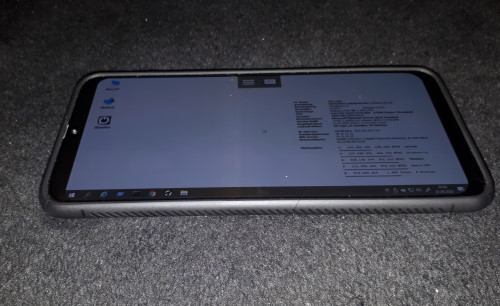
#Aprilscherz. Wie smartphone leaks, die Quelle für "Erlkönige" im Handy Umfeld heute veröffentlichte, hat #Samsung die neue W-Serie fertig gestellt. Wie unbestätigte Meldungen sagen, hat Microsoft mit Abkündigung seiner #Windows phone Hardware und Software das Knowhow an Samsung verkauft.
Das Highlight des neuen Telefons ist, das es auf einem Intel Core I5M Prozessor der 12-Generation beruht. Eckdaten sind:
32 GB RAM, eine 2TB große SSD, ein 7 Zoll AMOLED Display mit 500 lumen und einer 4K-Auflösung. Den Grafikchip stellt NVidia.
Im Gegensatz zur vorigen Generation kommt nicht mehr das abgekündigte Windows 10 Mobile zum Einsatz, sondern das voll ausgewachsene Windows 10 Pro. Damit lässt sich das Smartphone in die Unternehmens-Domäne integrieren und wie ein PC oder Notebook über die gleichen Gruppen-Richtlinien administrieren.
Auch die vollständige 32-Bit udn 64-Bit Desktop-Software wie Microsoft Access aus dem Office Proplus Abo oder Paket funktioniert.
Aus meiner Sicht wird das Smartphone ein Renner.
(Post ID:1439, erstellt am: 01.04.2020 04:01:00 von: Patrick Bärenfänger)
Delightful Download Plugin Doku
Da das Open Source Delightful #Download Plugin für #Wordpress zwar im Quellcode noch auf Github zu finden ist, aber dort keine Dokumentation liegt, habe ich die mir heruntergeladene Doku mal aufbereitet und stelle sie hier zur Verfügung. Die Doku ist in englischer Sprache und erklärt Shortcodes und Attribute. Ich habe die Möglichkeit und Wildcard, eine Beschreibung zum Download einzugeben, ergänzt, sowie einige Ausgabeformate (box, link) und die Listenausgabe angepasst.
---------------------------------- Delightful Downloads Documentation ----------------------------
------------------------------------ FAQ -------------------------
General
Can I manually upload files via FTP/SFTP?
Yes, simply upload them to your server anywhere within the WordPress file structure (usually wp-content/uploads/). Once uploaded, you can enter the file URL into the Add New Download screen.
How do I increase the maximum file upload size?
Please refer to this tutorial on how to increase the maximum file size in WordPress.
How do I add additional allowed file types to the file uploader?
Please refer to this tutorial on how to add additional file types to WordPress.
Usage
How do I output a single download link?
Use the shortcode [[ddownload id="123"]]. Replace the ID with the desired download ID, which can be found in the All Downloads screen.
How do I output a single download file size?
Use the shortcode [[ddownload_size id="123"]]. Replace the ID with the desired download ID, which can be found in the All Downloads screen.
How do I output the number of times a single file has been downloaded?
Use the shortcode [[ddownload_count id="123"]]. Replace the ID with the desired download ID, which can be found in the All Downloads screen.
How do I output a list of download links?
Use the shortcode [[ddownload_list]].
How do I output the number of times all of my files have been download?
Use the shortcode [[ddownload_total_count]].
Troubleshooting
Why when I click a download link does the download count not update?
This is usually caused by being logged in as an admin. Downloads by admin users are not automatically logged, however you can change this behaviour in the Settings screen under the Statistics tab.
If using the [[ddownload_total_count]] shortcode, the count is also cached by default and will only update every few minutes based on the Cache Duration, which is set in the Settings screen under the Advanced tab.
Why do I receive a 403 Forbidden error when I try to access a file directly?
Delightful Downloads automatically blocks direct access to files stored within the wp-content/uploads/delightful-downloads/ directory. To access the file you must use the [[ddownload id="123"]] shortcode.
Why do my files download with the incorrect file extension?
This is caused when WordPress does not know the file type your are serving to users. Please refer to this tutorial on how to add additional file types to WordPress.
Why do my remote files open directly in the browser?
When serving remote files it is not possible to set the correct headers which force a file to be downloaded, instead the browser will attempt to open them.
Why do my files show a file size of unknown?
This is caused when the file does not exist at the location specified or is inaccessible due to incorrect permissions.
-----------------------------------Shortcodes----------------------
[[ddownload_count]]
You can output the number of times a download has been downloaded using the [[ddownload_count]] shortcode. You must supply a download ID and optional attributes can be supplied to further customise the output. To output a download count using the default settings: [[ddownload_count id="123"]]
You can find the ID of a download in the All Downloads screen.
All Downloads Screen
Attributes
The following are optional attributes that will modify the output.
format
Format the number (10000 becomes 10,000). Default: true.
[[ddownload_count id="123" format="false"]]
-----------------------------------------------
[[ddownload_filesize]]
You can output the file size of a download using the [[ddownload_filesize]] shortcode. You must supply a download ID and optional attributes can be supplied to further customise the output. To output a file size using the default settings: [[ddownload_filesize id="123"]]
You can find the ID of a download in the All Downloads screen.
All Downloads Screen
Attributes
The following are optional attributes that will modify the output.
format
Format the number (100000 becomes 97.66 KB). Default: true.
[[ddownload_filesize id="123" format="false"]]
-----------------------------------------------
[[ddownload_list]]
You can output a list of downloads using the [[ddownload_list]] shortcode. Optional attributes can be supplied to customise the output. To output all published downloads, sorted by title in ascending order: [[ddownload_list]]
Attributes
The following are optional attributes that will modify the output.
cache
Cache the results. The amount of time the results are cached for can be set in the Settings screen under the Advanced tab. Default: true.
categories
Show only downloads within specified categories. Comma separated list of category slugs. Default: blank.
exclude_categories
Exclude downloads within specified categories. Comma separated list of category slugs. Default: blank.
exclude_tags
Exclude downloads within specified tags. Comma separated list of tag slugs. Default: blank.
limit
Limit the number of downloads to display. Set to 0 to show all results. Default: 0.
order
The order in which results are displayed. Set to either ASC or DESC. Default: ASC.
orderby
The option in which results should be sorted by. The available options are title, date, count (Download count), filesize, random. Default: title.
relation
When using both categories and tags together this attribute specifies the relationship between the two. The options are AND (Must be in all), OR (Must be in at least one). Default: AND.
style
The output style that should be used to display the list of downloads. The default options are title, title_date, title_downloads, title_filesize. Custom list styles can also be added, as detailed here.
tags
Show only downloads within specified tags. Comma separated list of tag slugs. Default: blank.
-----------------------------------------------
[[ddownload_total_count]]
You can output the total number of downloads for all files using the [[ddownload_total_count]] shortcode. Optional attributes can be supplied to further customise the output. To output the total download count with the default settings: [[ddownload_total_count]]
Attributes
The following are optional attributes that will modify the output.
cache
Cache the results. The amount of time the results are cached for can be set in the Settings screen under the Advanced tab. Default: true.
[[ddownload_total_count cache="false"]]
days
Show the total download count over the last number of days. Set to 0 for all time. Default: 0.
[[ddownload_total_count days="7"]]
format
Format the number (10000 becomes 10,000). Default: true.
[[ddownload_total_count format="false"]]
-----------------------------------------------
[[ddownload]]
You can easily output a single download using the [[ddownload]] shortcode. You must supply a download ID and optional attributes can be supplied to modify the output. To output a download using the default settings: [[ddownload id="123"]]
You can find the ID of a download in the All Downloads screen.
All Downloads Screen
When no optional attributes are supplied Delightful Downloads will use the default values which can be configured in the Settings screen under the Shortcodes tab.
Settings Screen Shortcodes Tab
Attributes
The following optional attributes will modify the output on a per-download basis.
text
Set the text to display on links/buttons. You may use wildcards to dynamically enter data.
[[ddownload id="123" text="Download my File"]]
style
Set which output style to use. The default output styles are link, button or plain text. Custom output styles can also be added, as detailed here.
[[ddownload id="123" style="link"]]
button
Set which button to use if the style attribute is set to button. The default buttons are black, blue, grey, green, purple, red and yellow. Custom buttons can also be added, as detailed here.
[[ddownload id="123" style="button" button="red"]]
class
Add any custom CSS classes to the output.
[[ddownload id="123" class="custom-class button-large"]]
Examples
A link output with the file size displayed:
[[ddownload id="123" style="link" text="Download (%filesize%)"]]
A button output with the download count displayed:
[[ddownload id="123" style="button" text="Download (%count%)"]]
-------------------------- Wildcards --------------------------------------------------
Wildcards
Wildcards allow you to dynamically enter data associated with a download. The available wildcards are:
%count%
The number of times the download has been downloaded.
%date%
The date the download was published.
%ext%
The file extension.
%filename%
The file name of the download.
%filesize%
The file size of the download.
%id%
The unique identifier of the download.
%mime%
The mime type of the download.
%icon%
displays the file type icon for the extension.
%title%
The title of the download entered in the Add Download screen.
%description%
The ecxerpt of description of the download entered in the Add Download screen
%url%
The URL to the download file.
Where To Use Them
Wildcards can generate dynamic data in the following places:
The text attribute of the [[ddownload]] shortcode. Examples:
[[ddownload text="Download - %date%"]]
[[ddownload text="Download (%filesize%)"]]
[[ddownload text="Download (Downloaded: %count%)"]]
The Default Text field in the Settings screen under the Shortcodes tab.
Settings Screen Default Text
------------------------- List Types ----------------------------------------
Choose the default list type for shortcode: ddownload_list in the admin dashboard:
title, title_date, title_count, title_filesize, title_ext_filesize,
title_date_ext_filesize,
title_ext_filesize_count,
icon_title_ext_filesize_count
------------------------- Styles for output ---------------------------------
valid values for the shortcode attribute styles are. Can be found in includes/functions.php:
button = colored button with download or download Text wildcards
infobox = white box with grey border, filetype icon and all possible details
link = Download Link, displays DOWNLOAD or selected wildcards as text field
plain_text = Download URL (quicklink) as text
(Post ID:1401, erstellt am: 22.03.2020 11:31:24 von: Patrick Bärenfänger)